 how-to
How to Verify Online Store Security: 7 Steps
Table of Contents
- Check for HTTPS and the Padlock Icon
- SSL Certificate Verification for Shoppers
- Verify Website Trust Seals and Security Badges
- How to Spot a Fake Shopping Website
- Secure Payment Methods for Online Shopping
- Assess Domain Age and Check Registration Details
- Review Contact Information and Customer Support
- Conclusion
Last Updated: August 24, 2026
When you shop online, security isn't optional, it's essential. How to verify online store security before entering your payment information can mean the difference between a smooth transaction and becoming a victim of fraud. At Esther Tech Shop, we prioritize customer safety with secure payment processing and transparent security practices, and we want you to understand how to evaluate any online retailer before making a purchase. This guide walks you through seven concrete steps to verify that an online store is legitimate and safe.
Check for HTTPS and the Padlock Icon
The first thing to check when visiting any online store is whether the connection is secure. A legitimate shopping website uses HTTPS (Hypertext Transfer Protocol Secure), not the older HTTP standard. You'll see this in the browser address bar, look for "https://" at the beginning of the URL and a padlock icon next to it.
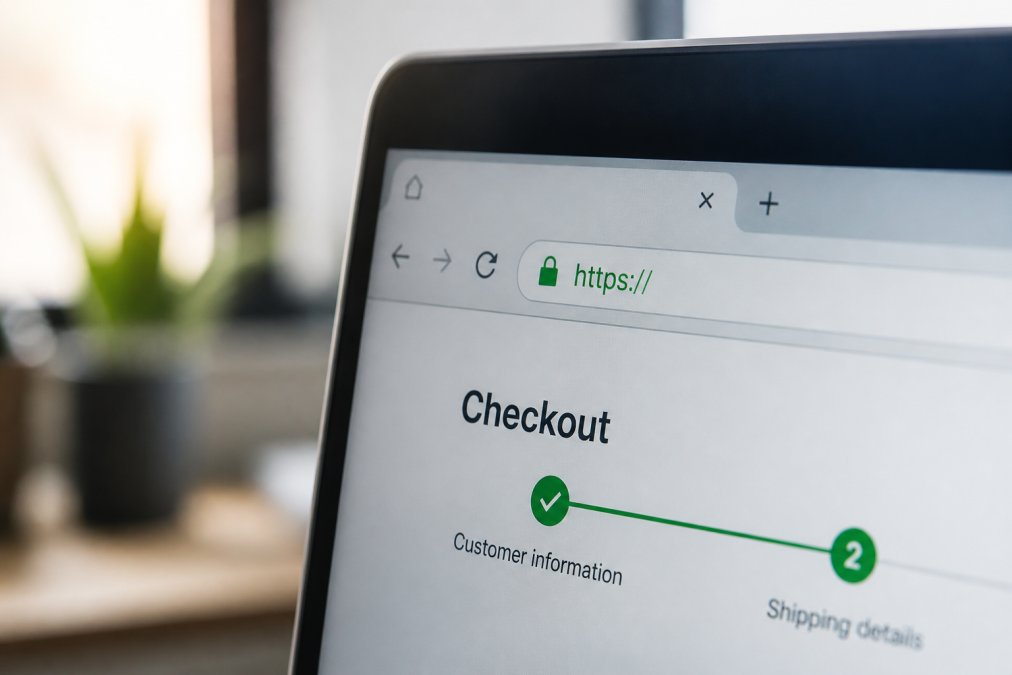
The padlock icon confirms that the connection between your browser and the website's server is encrypted. This encryption protects your data from being intercepted by third parties. If you don't see the padlock or the URL shows "http://" without the "s," stop. Do not enter any personal information or payment details on that site.
Some browsers display additional security information when you click the padlock. You'll see details about the SSL certificate and the organization that owns the site. This transparency is a good sign. If clicking the padlock shows warnings or errors, that's a red flag. Avoid that website entirely.
SSL Certificate Verification for Shoppers
An SSL (Secure Sockets Layer) certificate is the technical foundation that makes HTTPS work (nist.gov). When a website has a valid SSL certificate, it means the site's identity has been verified by a trusted certificate authority. You don't need to be a technician to understand this, you just need to know what to look for.
Click the padlock icon in your browser's address bar. Most browsers will display certificate information, including the organization name, issue date, and expiration date. The certificate should be current and not expired. If the certificate expired months ago, that's a major warning sign that the site isn't being actively maintained or monitored.
Pay attention to the organization name shown in the certificate. It should match the company running the website. If you're shopping at "example-store.com" but the certificate is issued to "random-company.net," something is wrong. Mismatched certificates often indicate a phishing site designed to steal your information.
You can also verify an SSL certificate independently using online tools. Search for "SSL certificate checker" and enter the website's domain. These free tools will show you the certificate details, including who issued it and whether it's valid. Legitimate retailers understand that customers want verification, they won't hide this information.
Verify Website Trust Seals and Security Badges
Trust seals and security badges are visual indicators that a website has passed security audits or meets industry standards. You'll typically find these badges in the footer of a website, on the checkout page, or near the payment form. Common legitimate badges include Norton Secured, McAfee Secure, Trustwave, and BBB (Better Business Bureau) certification.
However, trust badges can be faked. Scammers sometimes display fake badge images that look like the real thing but don't actually verify anything. To confirm a badge is legitimate, click on it. A real badge will link to the certifying organization's website where you can verify the site's status. If the badge doesn't link to anything or links to an unrelated page, it's likely fake.
Check the issuing organization's official website directly. For example, if you see a Norton Secured badge, visit Norton's website and use their verification tool to confirm the store is actually certified. Don't just trust the badge appearance, verify it independently.
Different badges indicate different levels of security verification. Some badges confirm only that the site uses encryption, while others indicate that the company has passed more rigorous security audits. Understanding what each badge means helps you assess the site's commitment to security. A site with multiple legitimate badges from different organizations has likely invested more heavily in security than a site with none.
How to Spot a Fake Shopping Website
Fake websites designed to steal payment information often share common characteristics. Learning to recognize these patterns protects you before you enter sensitive data. Start by examining the overall design and professionalism of the site.
Legitimate retailers invest in professional web design, clear navigation, and high-quality product images. If a site looks hastily thrown together, uses low-resolution images, or has numerous spelling and grammar errors, be cautious. Poor design doesn't always mean fraud, but it suggests the business may not be established or well-managed.
Check the website's domain name carefully. Scammers often register domains that closely mimic legitimate retailers, for example, "amaz0n.com" instead of "amazon.com" or "appel.com" instead of "apple.com." The slight difference can fool you if you're not paying attention. Type the URL directly into your browser rather than clicking a link from an email or advertisement.
Look for contact information on the site. Legitimate businesses provide multiple ways to reach them: a physical address, phone number, email address, and often a contact form. If a site has no contact information or only an email address with a generic domain like Gmail, that's suspicious. Established retailers maintain professional contact channels because they expect customer questions.
Review the site's policies carefully. Legitimate retailers clearly display their return policy, shipping policy, and privacy policy. Read the privacy policy to understand how the company handles your data. If the policies are vague, missing, or seem designed to hide information, reconsider shopping there.
Check for customer reviews on independent platforms. Search the company name plus "reviews" on Google, Trustpilot, or other review sites. Real customer feedback reveals whether people have had positive experiences. Be aware that fake websites often have no reviews or only glowing reviews with suspicious language. Legitimate sites have a mix of positive and critical reviews.
Secure Payment Methods for Online Shopping
How you pay matters as much as where you shop. Different payment methods offer different levels of protection against fraud and data theft. Understanding these options helps you choose the safest approach for each purchase.
Credit cards offer strong fraud protection. If your credit card information is stolen, you can dispute fraudulent charges with your card issuer. Most credit card companies limit your liability for unauthorized purchases to $50 or zero, depending on your card and when you report the fraud (the FTC). This protection makes credit cards one of the safest payment methods for online shopping.
Debit cards provide less protection than credit cards. If your debit card number is compromised, fraudsters can drain your bank account directly. While you may eventually recover the money, the process takes longer than credit card disputes, and your actual funds are at risk in the interim.
Virtual credit card numbers offer an excellent middle ground. Services like Privacy.com and most major credit card issuers allow you to generate temporary card numbers for online purchases. Each virtual number is tied to your real account but can be used only once or for a specific merchant. If the temporary number is stolen, it can't be used elsewhere, and you can simply disable it. This method combines credit card protection with an extra layer of security.
PayPal and similar digital payment services act as intermediaries between you and the merchant. You don't share your payment information directly with the store, you authenticate with PayPal instead. This separation protects your financial information. PayPal also offers buyer protection for unauthorized transactions and items not received.
Avoid wire transfers, gift cards, and cryptocurrency for online shopping. These payment methods offer no fraud protection and no way to recover your money if something goes wrong. Scammers specifically request these payment methods because they know they can't be reversed.
Always check that the payment page itself is secure before entering information. Look for the padlock icon and "https://" in the address bar. The payment form should never redirect you to a third-party site unless you're using a service like PayPal intentionally. Legitimate retailers process payments on their own secure servers or through established payment processors.
Assess Domain Age and Check Registration Details
A website's domain age can reveal useful information about the business. Established businesses typically own domains registered years ago. New domains aren't inherently suspicious, legitimate startups register new domains all the time, but combined with other warning signs, a very new domain warrants extra caution.
Check domain registration information using WHOIS lookup tools. Search "WHOIS lookup" online and enter the website's domain. The results show when the domain was registered, when it expires, and who registered it. Legitimate businesses typically use their company name or a professional registrar. If the registration is hidden behind privacy protection services, that's not necessarily a red flag, many legitimate companies hide registration details for privacy, but it's worth noting.
Look at the domain expiration date. If a domain expires soon and hasn't been renewed, the business may be shutting down or the site may have been abandoned. This doesn't mean fraud, but it suggests the business isn't stable or active. Scam sites are sometimes set up quickly and abandoned just as fast.
Research the company's history. Search for news articles, press releases, or social media accounts. How long has the business been operating? Do they have an established presence beyond their website? Legitimate retailers typically have multiple touchpoints, social media accounts with regular activity, mentions in industry publications, or customer reviews across multiple platforms.
Review Contact Information and Customer Support
Legitimate online retailers maintain accessible customer support because they expect questions and want to resolve issues. Check what contact methods the site offers. The best retailers provide multiple options: phone support, email, live chat, and a contact form.
At Esther Tech Shop, for example, customer service is available Monday through Saturday, 9 a.m. to 8 p.m. This commitment to accessibility demonstrates that the business stands behind its products and takes customer concerns seriously.
Test the support channels before making a purchase if you have questions. Send an email or use the live chat to ask about a product. How quickly do they respond? Is the response professional and helpful? If you can't reach support or if they ignore your questions, that's a warning sign.
Verify the physical address listed on the website. Legitimate businesses provide a real, verifiable address. You can check the address using Google Maps to confirm the location exists. Some scam sites list fake addresses or addresses that don't match their claimed location. If the address is a mail drop or seems suspicious, investigate further.
Look for a phone number and call it. Legitimate businesses answer their phones or have professional voicemail systems. If the number is disconnected or goes to an unrelated business, something is wrong. Be aware that some legitimate online-only retailers may not have a physical storefront, but they should still have a real business address and phone number.
Check the site's social media presence. Established retailers maintain active social media accounts with regular posts and customer engagement. Look at the account history, are they recent or established? Do they respond to customer comments and messages? An active social media presence suggests a real, established business.
Conclusion
Verifying online store security protects both your financial information and your personal data. By checking for HTTPS encryption, SSL certificates, legitimate trust seals, and professional business practices, you can shop with confidence. When you're ready to purchase tech accessories from a retailer committed to security, Esther Tech Shop offers secure payment processing, fast 24-48 hour shipping, and responsive customer service Monday through Saturday. With multiple layers of security and transparent business practices, shopping at Esther Tech Shop means your order arrives safely and your data stays protected.
Frequently Asked Questions
How can I verify if an online store is legitimate before entering my credit card information?
Check for HTTPS encryption and a padlock icon in your browser's address bar. Look for trust seals from recognized security providers like Norton or McAfee. Verify the domain age using WHOIS lookup tools, and search the store's name plus 'reviews' or 'scam' online. Legitimate stores display clear contact information, a detailed privacy policy, and terms of service. If something feels off about the website design or grammar, trust your instinct, fraudulent sites often have poor presentation.
What is an SSL certificate and why does it matter for online shopping security?
An SSL certificate encrypts data transmitted between your browser and the website's server, protecting sensitive information like credit card numbers and addresses. When a site has a valid SSL certificate, your browser displays a padlock icon and HTTPS in the URL. This encryption prevents cybercriminals from intercepting your data. Legitimate e-commerce sites invest in SSL certificates because they're essential for secure transactions. Always verify the SSL certificate by clicking the padlock icon to confirm the certificate details match the website's domain.
What are common signs of a fake shopping website I should watch for?
Fake sites often display poor grammar, misspelled words, and low-quality images that don't match product descriptions. They may lack contact information, offer unrealistically low prices, or pressure you to complete purchases quickly. Check if the domain looks suspicious, scammers sometimes use URLs similar to legitimate retailers but with slight variations. Missing privacy policies, terms of service, or vague return policies are red flags. Real stores like Esther Tech Shop provide clear contact details, professional design, and transparent policies.
Are virtual credit cards safe to use for online shopping?
Yes, virtual credit cards add an extra layer of security for online purchases. They generate temporary card numbers linked to your actual account, limiting exposure if a retailer's payment system is compromised. If a virtual card number is stolen, the thief can only use that specific temporary number, not your real credit card. Many banks and credit card companies offer virtual card services free of charge. Use them especially when shopping on unfamiliar sites or when you're unsure about a retailer's security practices.
This article was written using GrandRanker