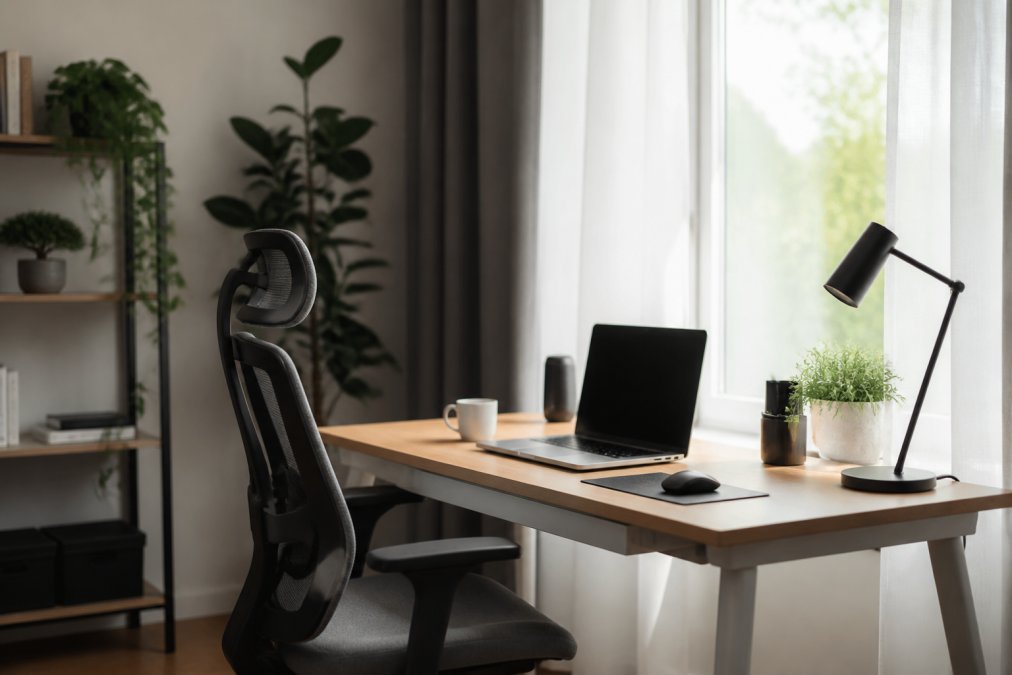
 ultimate-guide
Modern Home Office Setup Tips: A 2026 Guide
Table of Contents
- What Makes a Modern Home Office Setup Work
- Ergonomic Home Office Essentials You Actually Need
- How to Organize Desk Cables for a Clutter-Free Workspace
- Minimalist Desk Setup Ideas That Maximize Productivity
- Lighting, Acoustics, and Environmental Comfort
- Building Your Setup on a Budget
- Frequently Asked Questions
Last Updated: September 1, 2026
What Makes a Modern Home Office Setup Work
A modern home office setup balances ergonomics, cable management, and environmental comfort to create a workspace where productivity thrives. This isn't about having the most expensive gear, it's about intentional choices that reduce strain, eliminate clutter, and support focus during long work sessions.
The foundation of any effective home office setup rests on three pillars: your body's alignment, your visual comfort, and your ability to access what you need without distraction. When these align, you stop fighting your environment and start working within it.
At Esther Tech Shop, we offer high-quality accessories that transform workspaces. The difference between a chaotic desk and an optimized one often comes down to decisions about chair height, monitor positioning, and how you route your cables. These aren't luxuries, they're the mechanics that determine whether you finish the day energized or exhausted.
What separates a setup that works from one that merely exists is attention to the small details most people overlook. A monitor positioned two inches too low creates neck strain that compounds over weeks. Cables draped across your desk consume mental energy every time you look at it. Poor lighting causes eye fatigue that masks itself as general tiredness. Each of these problems has a straightforward solution.
Ergonomic Home Office Essentials You Actually Need
Your body spends eight hours or more in your chair and at your desk. Treating this as secondary to your monitor or keyboard is the first mistake most people make.
Chair and Desk Positioning
Start with your chair. An ergonomic chair isn't a luxury item, it's the single largest factor in preventing the back and neck pain that remote workers commonly report. The chair should support your lumbar spine, keep your feet flat on the floor, and allow your arms to rest at 90 degrees when your hands are on the keyboard.
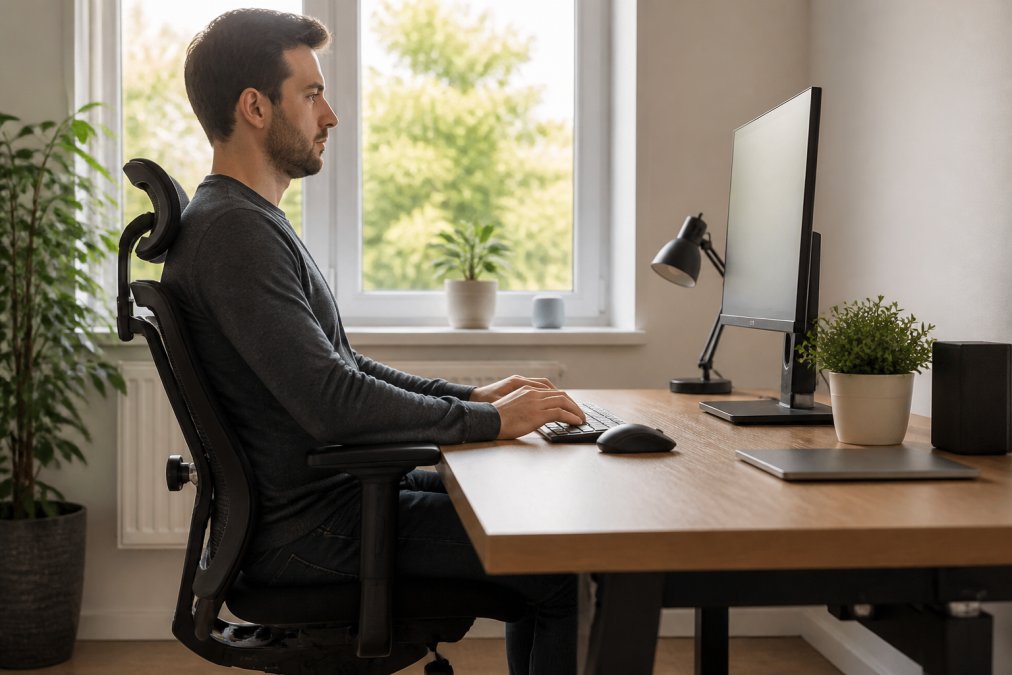
Your desk height matters equally. When seated with proper posture, your elbows should be at 90 degrees and your forearms parallel to the floor. Most standard desks are too high for most people. If you're hunching forward or reaching up to your keyboard, your desk is working against you, not for you.
A sit-stand desk offers flexibility that a fixed desk cannot. The ability to shift between sitting and standing throughout the day reduces the static strain of staying in one position. You're not standing for eight hours, you're breaking up eight hours of sitting into manageable chunks. Even 20 minutes of standing every two hours creates measurable relief.
The distance between your eyes and your monitor should be an arm's length away, roughly 24 to 30 inches (osha.gov). Closer than that and you're straining. Farther away and you're squinting. Your monitor should sit at eye level when you're looking straight ahead, not tilted down. This prevents the forward head posture that leads to neck pain.
Monitor, Keyboard, and Peripheral Setup
A single monitor forces you to choose between size and distance. Dual monitors solve this by giving you screen real estate without the eye strain of constantly refocusing. If you're running multiple applications, email, documents, reference material, a second monitor eliminates the window-switching that fragments your attention.
Position monitors directly in front of you, not angled. Your primary monitor should be straight ahead; if you use a second, angle it slightly so you're not twisting your neck. A monitor arm frees up desk space and lets you adjust height and angle without fumbling with the monitor base.
Your keyboard and mouse should sit at the same height, your elbows at 90 degrees when using them (the CDC). This is where most people create problems. Keyboards that sit on the desk surface are usually too high. A keyboard tray or an adjustable desk that lets you lower your work surface solves this. Your wrist should be neutral, not bent upward or downward.
A mechanical keyboard with a wrist rest reduces fatigue during long typing sessions. The tactile feedback of mechanical switches also reduces the force needed per keystroke, you're not bottoming out each key. An ergonomic mouse that supports your palm prevents the wrist strain that comes from gripping a standard mouse all day.
How to Organize Desk Cables for a Clutter-Free Workspace
Cable clutter is more than an aesthetic problem. Visual disorder creates cognitive load, your brain is processing the mess even when you're not consciously aware of it. A clean desk reduces mental friction and makes it easier to focus.
Cable Routing and Containment
Start by identifying what needs power. Most people have far more cables than necessary. Consolidate charging with a wireless solution where possible. This alone eliminates 30-40 percent of typical desk cable volume.
For cables that must stay, route them behind your desk and out of sight. Cable trays mounted under the desk surface create a dedicated channel. Use cable ties or velcro straps to bundle cables together, not too tight, which restricts airflow, but snug enough that they don't migrate.
Label each cable at both ends. This takes ten minutes and saves hours when you need to unplug something. A simple label maker or masking tape with a pen works perfectly. You'll thank yourself the next time you need to identify which cable powers what.
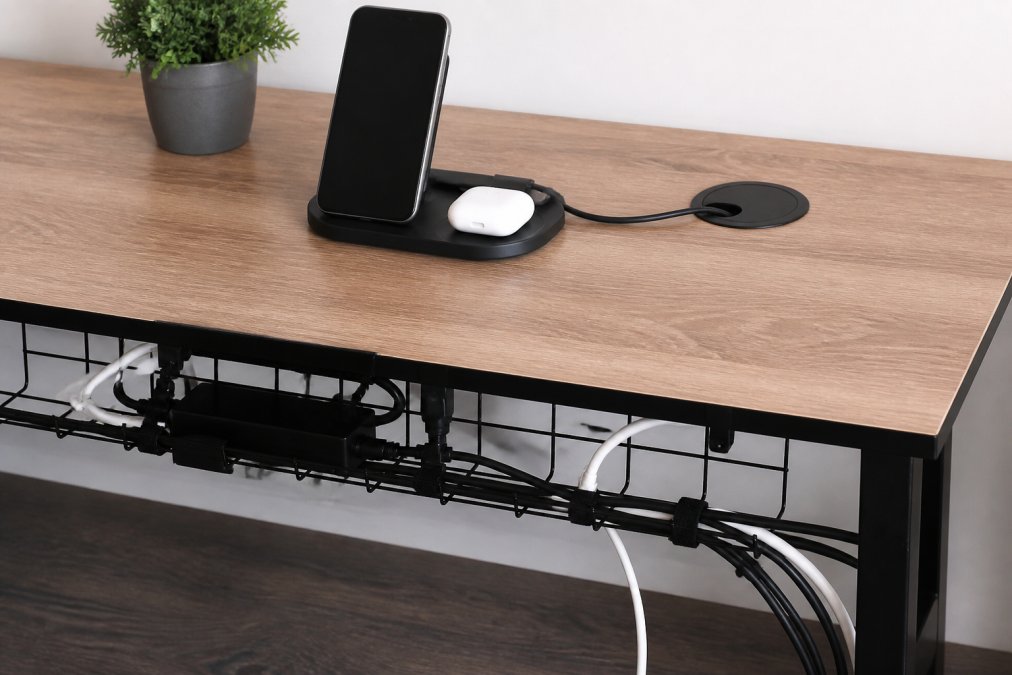
Cable routing isn't just about aesthetics, it's about airflow and safety. Bundled cables generate heat. Proper spacing prevents overheating and extends the life of your equipment. Cables should never be pinched, crimped, or run under furniture where they can be damaged.
Wireless Solutions and Charging Stations
Wireless charging eliminates the most frequently used cables, phone, earbuds, and smartwatch. A single charging station consolidates three separate cables into one power input. The 3-in-1 Magnetic Wireless Charging Station from Esther Tech Shop handles this elegantly: your phone magnetically snaps into alignment, your earbuds and watch sit in their dedicated cradles, and everything charges from a single USB-C input. At $44.99, it's a straightforward way to reduce desk clutter while ensuring your devices are always charged.

Wireless charging stations do more than declutter. They create a designated "device home" so your phone isn't wandering across your desk. When everything has a place, you spend less time searching and more time working.
Consider a wireless charging pad for your desk surface if you frequently switch between devices. The investment in wireless solutions can lead to fewer cables, easier rearrangement, simpler troubleshooting, and a workspace that feels intentional rather than accidental.
Minimalist Desk Setup Ideas That Maximize Productivity
Minimalism in a workspace doesn't mean sparse or cold. It means every item on your desk serves a purpose. The goal is to remove friction, not personality.
A minimalist desk setup starts with a single monitor and a single input device, your keyboard. If you need a second monitor, that's fine, but resist the urge to fill your desk with peripherals you use once a month. The items you use daily should be within arm's reach. Everything else should be stored.
Vertical storage transforms a desk that feels cramped into one that feels open. Wall-mounted shelves, pegboards, or floating cabinets keep supplies and equipment accessible without consuming desk surface. A single desk lamp with adjustable brightness eliminates the need for multiple light sources.
Cable management becomes easier when you're intentional about what lives on your desk. Wireless peripherals reduce cable volume. Charging stations consolidate power inputs. A small cable organizer keeps the few cables you do have from creating a tangled mess.
The minimalist approach also means resisting the accumulation of "just in case" items. That extra monitor you might use someday, the backup keyboard, the cables for devices you no longer own, these create visual noise and mental load. Keep what you use. Store or discard the rest.
Lighting, Acoustics, and Environmental Comfort
Your environment shapes your ability to concentrate. Lighting and sound are the two most overlooked factors in workspace design.
Proper lighting prevents eye strain and supports your circadian rhythm. Natural light is ideal, it's free and it regulates your sleep-wake cycle. Position your desk perpendicular to windows so light comes from the side, not directly behind your monitor. Direct backlighting creates glare; side lighting is gentler on your eyes.
Task lighting supplements natural light and reduces shadows on your work surface. A desk lamp with adjustable brightness and color temperature lets you match lighting to the time of day. Cooler light (5000K-6500K) during morning and afternoon work sessions supports alertness (the NIH). Warmer light (3000K-4000K) in the evening reduces the blue light that interferes with sleep.
Acoustic treatment matters more than most people realize. Hard surfaces, wood desks, glass, tile floors, reflect sound and create a harsh environment. Soft furnishings absorb sound: rugs, curtains, upholstered chairs, and acoustic panels reduce echo and create a quieter space. If you're on video calls, acoustic treatment prevents the hollow sound that frustrates both you and your audience.
Noise-canceling headphones create a personal acoustic boundary when your environment is noisy. They're not just for music, they signal to others that you're focused and they provide a consistent sound environment regardless of what's happening around you.
Temperature and air quality matter more than people admit. A warm room makes you drowsy. A cold room makes you tense. Aim for 68-72 degrees Fahrenheit. Air circulation prevents stuffiness and the cognitive fog that comes with poor ventilation. A small desk fan or open window provides enough movement to keep the air fresh.
Building Your Setup on a Budget
A high-quality home office setup doesn't require unlimited spending. Strategic choices let you build something effective incrementally.
Start with your chair. This is the one item worth investing in early. A good ergonomic chair costs between $150 and $400. You spend more time in your chair than anywhere else, this is where your budget should concentrate. Cheaper chairs deteriorate quickly and often create the posture problems you're trying to prevent.
Your desk is secondary. A simple table with proper height works fine. The investment in a sit-stand desk can wait until you've proven you'll actually use the standing feature. A basic desk costs $100-200. A quality sit-stand desk costs $400-800. Start simple and upgrade when you know what you need.
Monitor positioning is free if you use what you have. A monitor arm costs $30-80 and solves positioning without replacing your monitor. A second monitor adds $150-300 but dramatically improves workflow if you work with multiple applications.
Cable management is inexpensive. Cable trays cost $15-30. Velcro straps cost $5-10 for a pack. Labels are nearly free. These small investments pay immediate dividends in visual clarity and mental space.
Lighting is affordable. A basic desk lamp costs $20-40. Adding a second light source for ambient illumination costs another $30-50. These create dramatic improvements in eye comfort and mood.
Wireless charging consolidates cables and costs less than you'd spend replacing individual chargers. The 3-in-1 Magnetic Wireless Charging Station from Esther Tech Shop at $44.99 replaces three separate chargers and cables, a genuine cost savings plus the benefit of reduced clutter.
The budget approach is to prioritize ergonomics first, then cable management, then environmental comfort. Spend on what directly impacts your body and focus. Everything else can be added gradually as your needs become clear.
Creating a modern home office setup that actually works requires balancing ergonomics, organization, and environment. The goal isn't perfection, it's a workspace where your body stays comfortable, your mind stays focused, and you finish the day without unnecessary strain. Start with your chair and monitor positioning. Add cable management to clear visual clutter. Layer in lighting and acoustic treatment as your budget allows. Esther Tech Shop offers high-quality accessories like the 3-in-1 Magnetic Wireless Charging Station that reduce cable chaos while keeping your devices charged and accessible. With thoughtful choices and intentional organization, your home office becomes a place where productivity flows naturally.
Frequently Asked Questions
Q: What are the essentials for a modern home office setup?
A: Start with ergonomic fundamentals: a chair with lumbar support, a desk at elbow height, and a monitor positioned at eye level about 20-26 inches away. Add task lighting to reduce eye strain, a keyboard and mouse for proper wrist alignment, and cable management solutions to keep your workspace organized. These core elements form the foundation of any productive home office setup.
Q: How do I organize my desk cables to reduce clutter?
A: Group cables by function, use cable ties or trays to bundle them together, and route them behind your desk or through cable management channels. Consider wireless charging solutions like the 3-in-1 Magnetic Wireless Charging Station ($44.99) to eliminate multiple charging cables. Label cables at both ends so you know what each one connects to, and use adhesive clips to keep cables from sliding around.
Q: What ergonomic home office essentials prevent back and neck pain?
A: Prioritize a chair with adjustable lumbar support that maintains the natural curve of your spine. Position your monitor so the top of the screen is at or slightly below eye level to prevent neck strain. Your keyboard and mouse should sit at a height where your elbows rest at 90 degrees. A monitor arm or adjustable desk gives you flexibility to fine-tune these positions throughout the day.
Q: How can minimalist desk setup ideas improve my focus?
A: A minimalist desk removes visual distractions and decision fatigue. Keep only active work items visible, store supplies in closed storage, and use vertical space with shelving to reduce clutter. Wireless charging and cable management hide the visual noise of cords and adapters. This approach creates mental clarity and helps you focus on the task at hand rather than the chaos around you.
Q: What should I do about poor lighting in my home office?
A: Combine ambient lighting with task lighting. Position your desk perpendicular to windows to avoid screen glare, and use a task lamp with adjustable color temperature to reduce eye strain during long work sessions. Aim for 300-500 lux of light at your desk surface. Avoid harsh overhead lighting, and consider warm light (2700K) in the afternoon and cooler light (4000K) in the morning to support your natural rhythm.
Q: How do I set up a home office on a tight budget?
A: Start with the essentials: a supportive chair, a basic desk, and proper monitor positioning. You don't need expensive furniture initially, focus on ergonomic positioning first. Invest gradually in cable management, lighting, and accessories as your budget allows. Wireless charging solutions like the 3-in-1 Magnetic Wireless Charging Station ($44.99) provide multi-device charging without cluttering your desk, offering good value for the functionality.
Q: What's the best way to reduce noise during video calls from home?
A: Add soft furnishings like curtains, rugs, or foam panels to absorb sound and reduce echo. Position your desk away from hard surfaces and windows where sound bounces. Use a noise-canceling microphone or headset rather than relying on your computer's built-in mic. If possible, create a dedicated call corner with acoustic treatment or soft materials to improve audio quality during professional meetings.
Q: How can I incorporate natural elements into a minimalist home office?
A: Add a single plant or small biophilic element to your desk without creating clutter. Choose low-maintenance options like a pothos or snake plant that improve air quality and reduce stress. Use natural wood tones in your desk or shelving, and position your desk near a window for natural light and a view of outdoor elements. These additions enhance productivity and well-being without compromising minimalist principles.
This article was written using GrandRanker