 listicle
Premium Home Office Tech Upgrades for 2026
Table of Contents
- Why Premium Home Office Tech Upgrades Matter
- Display and Monitor Upgrades for Precision Work
- Ergonomic Office Chair Reviews: Finding Your Perfect Fit
- Noise-Canceling Headphones for Office Environments
- Home Office Lighting Setup for Reduced Eye Strain
- Audio and Video Conferencing Essentials
- Input Devices and Connectivity Solutions
- Acoustic Treatment and Power Management for Complete Optimization
Last Updated: August 6, 2026
Premium home office tech upgrades are no longer a luxury, they're essential for productivity, health, and professional presence. Whether you're managing back-to-back video calls, working through 8-hour focus sessions, or creating content, the right equipment transforms how you work. This guide from Esther Tech Shop covers the specific upgrades that matter most, helping you build a workspace engineered for performance.
The difference between a mediocre setup and an optimized one often comes down to details most people overlook: monitor height, chair support, lighting angle, and cable management. These directly affect your energy levels, eye comfort, and professional presence. Below, we'll walk through the upgrades that deliver measurable returns on your investment.
Why Premium Home Office Tech Upgrades Matter
A workspace built with intention performs differently than one that just happened. Remote workers who invest in proper ergonomic seating report fewer back and neck issues. Those using quality lighting experience less eye strain by day's end. People with professional audio equipment sound more credible on calls.
Studies show that workspace optimization correlates with sustained focus and reduced fatigue. For professionals juggling multiple video calls, content creation, or detailed analytical work, a premium setup pays for itself in productivity gains within weeks. Esther Tech Shop specializes in curating these upgrades, the pieces that actually matter, so you don't waste money on gadgets that look impressive but don't change how you work.
The challenge isn't finding tech. It's finding the right combination for YOUR workflow. A monitor perfect for video editing might be overkill for email and spreadsheets. A chair that supports 8-hour coding sessions might feel stiff for casual desk work. This guide helps you navigate those trade-offs by focusing on what actually moves the needle for remote professionals.
Display and Monitor Upgrades for Precision Work
Your monitor is your window into your work. Upgrading from a standard 1080p display to a higher-resolution option immediately changes what's possible on your desk.
The Apple Studio Display ($1,599) is the choice for Mac-first workflows. Its 27-inch 5K Retina display delivers 5120 x 2880 resolution with exceptional color accuracy. The 600 nits of brightness and P3 wide color gamut support make it ideal for creative professionals. The integrated 12MP Ultra Wide camera with Center Stage technology automatically frames you during video calls, and the six-speaker system with Spatial Audio handles both work calls and casual listening. The tradeoff is price and Mac exclusivity; if your workflow spans Windows or Linux, this isn't the answer.
For flexibility across operating systems, the Dell UltraSharp 27 4K Thunderbolt Hub Monitor (U2725QE) (pricing depends on quantity, dates, and delivery) is the practical alternative. Its 27-inch 4K UHD resolution (3840 x 2160) with 99% DCI-P3 color coverage and Delta E < 1.5 accuracy makes it excellent for design, video editing, and content creation. The Thunderbolt 4 hub with up to 90W power delivery means you can connect your laptop and get power, video, and data transfer through a single cable, a genuine cable management win. ComfortView Plus reduces blue light without color compromise, and the ergonomic stand offers height, pivot, swivel, and tilt adjustment.
The decision comes down to your ecosystem. Mac users with color-critical work benefit from the Studio Display's integration. Cross-platform users or those on a tighter budget get more value from the Dell's connectivity and adjustability.

Ergonomic Office Chair Reviews: Finding Your Perfect Fit
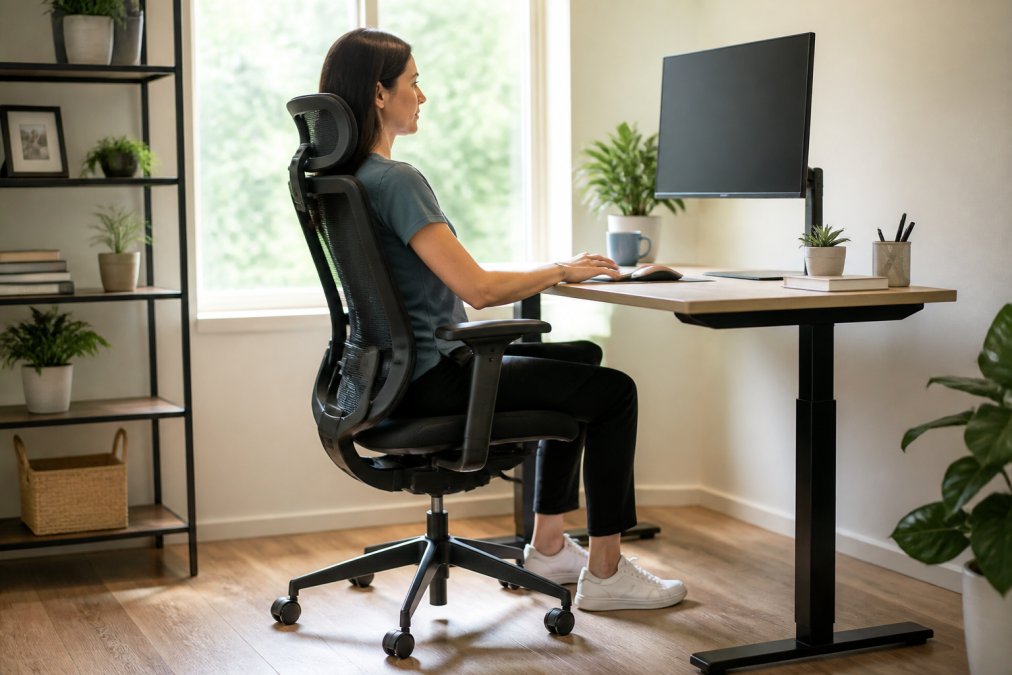
Your chair determines whether an 8-hour workday feels sustainable or punishing. The difference between a standard office chair and an ergonomic one designed for extended use is measurable in how your back feels by day's end.
The Herman Miller Aeron Chair ($1,860) is the gold standard for ergonomic seating. Its Pellicle mesh material breathes better than foam, distributing weight evenly and preventing heat buildup during long sessions. The PostureFit SL back support provides targeted lumbar support that adjusts to your spine's natural curve. The Harmonic 2 Tilt mechanism allows natural recline without sudden drops. Available in three sizes (A, B, C), it accommodates different body types. Fully adjustable arms, seat angle, and height let you dial in positioning for your exact frame. Herman Miller backs it with a 12-year warranty, reflecting their confidence in durability.
The investment is substantial, but this chair is designed for 40+ hours per week for a decade. If you're skeptical about spending nearly $2,000 on a chair, consider the alternative: chronic back pain, posture deterioration, and eventual physical therapy.
For those seeking a smart alternative, the Autonomous SmartDesk Connect (pricing depends on quantity, dates, and delivery) pairs with an electric standing desk to address ergonomic challenges differently. Rather than a premium static chair, this approach lets you alternate between sitting and standing throughout the day. The desk's height adjusts from approximately 2.5 to 4.5 feet, and the Bluetooth-connected app lets you program preferred heights and set reminders to switch positions. The anti-collision feature prevents damage if something's in the way during adjustment.
Noise-Canceling Headphones for Office Environments
Background noise is a silent productivity killer. Whether it's a neighbor's lawnmower, a roommate's video call, or ambient street noise, distractions fragment focus. Noise-canceling headphones restore control over your acoustic environment.
The Sony WH-1000XM5 Wireless Noise-Canceling Headphones ($399.99) deliver industry-leading noise cancellation with two processors and eight microphones working together to eliminate ambient sound. Battery life reaches 30 hours on a charge, with quick-charge capability for emergency top-ups. The lightweight design with soft-fit leather doesn't cause fatigue during extended wear. Precise Voice Pickup Technology ensures your voice comes through clearly during calls despite background noise.
These excel for remote workers in shared spaces, apartments, co-working environments, or homes with other people. The noise cancellation is so effective that many users report feeling isolated, which is precisely the point.
Home Office Lighting Setup for Reduced Eye Strain
Lighting determines whether you finish your workday with tired eyes or clear vision. Most home offices rely on overhead lights, which create harsh shadows and glare on screens. Professional lighting eliminates these problems.
The Elgato Key Light Air MK.2 ($169.99) is designed specifically for this challenge. Up to 2100 lumens of adjustable brightness let you dial in exactly how much light your workspace needs. The color temperature range from 2900K to 7000K means you can shift from warm (evening work) to cool (focus sessions) without changing fixtures. The edge-lit design produces soft, glare-free illumination with no harsh shadows. Wi-Fi connectivity lets you control it via the Elgato Control Center app, adjusting brightness and color temperature without leaving your desk.
Proper lighting setup follows a principle: ambient lighting provides overall illumination, and task lighting addresses your specific work area. The Key Light Air handles task lighting. Combine it with ambient overhead lighting set to lower intensity, and you've eliminated eye strain's primary causes.
Audio and Video Conferencing Essentials
Your presence on video calls shapes how colleagues perceive your professionalism and credibility. Poor audio or video quality undermines everything else you've optimized.
The Logitech MX Brio ($199.99) webcam delivers 4K Ultra HD resolution at 30fps or 1080p at 60fps, with AI-powered image enhancement that automatically adjusts exposure, white balance, and noise reduction. The Show Mode feature lets you tilt the camera down to easily share physical objects on your desk. Dual beamforming microphones with noise reduction capture your voice while suppressing background sound. The privacy shutter and fine controls via Logi Options+ software give you complete control over what's captured and transmitted.
For audio, the Shure MV7+ ($299) is the professional choice. This hybrid USB-C and XLR microphone works with both computers and audio interfaces. Voice Isolation Technology focuses on your voice and eliminates background noise, a genuine game-changer if you're in a noisy environment. The customizable LED touch panel controls mute and gain, and the ShurePlus MOTIV app lets you fine-tune EQ, compression, and limiting.
The combination of the Logitech MX Brio and Shure MV7+ creates a professional video conferencing setup that signals you take your work seriously.
Input Devices and Connectivity Solutions
Your mouse and keyboard are the interface between thought and action. Premium input devices reduce friction and fatigue while improving precision.
The Logitech MX Master 3S ($99.99) is the professional-grade mouse. Its 8K DPI optical sensor tracks on virtually any surface, including glass. MagSpeed Electromagnetic scrolling enables ultra-fast and precise navigation. Quiet Click buttons reduce the acoustic footprint in shared spaces. The ergonomic design minimizes hand strain during extended use. Multi-device switching via Logi Bolt USB receiver or Bluetooth lets you move seamlessly between your laptop, desktop, and tablet without reconnecting.
For connectivity, the Dell UltraSharp monitor's Thunderbolt 4 hub deserves emphasis. Single-cable connectivity to your laptop, power, video, and data transfer eliminates the cable nest most home offices accumulate.
Acoustic Treatment and Power Management for Complete Optimization
Two often-overlooked elements complete a professional workspace: acoustic treatment and power management.
Acoustic treatment addresses sound reflections that make video calls sound hollow and make focus difficult. Hard surfaces reflect sound and create echo. Adding soft materials, acoustic panels, heavy curtains, or bookshelves with books, absorbs sound and improves audio quality for both your calls and your own concentration. Strategic placement of soft materials behind your monitor and on adjacent walls significantly improves the acoustic environment.
Power management ensures your equipment stays protected and organized. A quality surge protector with multiple outlets consolidates power distribution and protects against electrical spikes. For home offices with multiple devices, a power strip with individual switches lets you cut power to idle equipment rather than leaving everything drawing standby power.
According to the U.S. Department of Energy, office equipment in standby mode accounts for measurable energy consumption. Switching off devices when not in use reduces both power draw and heat generation, extending equipment lifespan.
| Upgrade Category | Key Consideration | Primary Benefit |
|---|---|---|
| Display | Resolution and color accuracy | Reduced eye strain, improved precision |
| Seating | Lumbar support and adjustability | Reduced back pain, sustained focus |
| Noise Management | Isolation and acoustic treatment | Deeper concentration, better call quality |
| Lighting | Color temperature and brightness control | Reduced eye fatigue, natural rhythm support |
| Audio/Video | Microphone quality and camera resolution | Professional presence, clearer communication |
| Input Devices | Ergonomic design and precision | Reduced hand strain, faster workflow |
| Power Management | Surge protection and organization | Equipment protection, energy efficiency |
Building a premium home office isn't about accumulating gadgets, it's about engineering a workspace that supports how you actually work. The upgrades that matter most address the physical and environmental factors that directly impact your energy, focus, and professional presence. Esther Tech Shop specializes in sourcing these specific upgrades, ensuring you get quality equipment backed by fast 24-48 hour shipping, secure payment options, and attentive customer service available Monday to Saturday, 9 a.m.-8 p.m. Start with the categories that affect you most, ergonomic seating if you're experiencing back pain, lighting if eye strain is your bottleneck, audio if you're on constant calls, and build from there. Your workspace should work for you, not against you.
Frequently Asked Questions
What are the best premium home office tech upgrades for productivity?
The most impactful upgrades focus on ergonomics, display quality, and audio clarity. A 4K monitor like the Dell UltraSharp 27 reduces eye strain during extended work. An ergonomic chair such as the Herman Miller Aeron provides proper lumbar support for long hours. Noise-canceling headphones like the Sony WH-1000XM5 eliminate distractions, while a quality microphone like the Shure MV7+ ensures clear communication during video conferencing. These upgrades directly address workflow efficiency and comfort.
Is investing in high-end office tech actually worth the cost?
Yes, when you calculate the return. Remote workers spend 40+ hours weekly at their desk. Premium ergonomic seating prevents back pain and health issues that cost far more in medical care. High-resolution displays reduce eye strain and increase accuracy in detail-oriented work. Quality audio equipment improves communication clarity and professional presence in meetings. Esther Tech Shop's fast 24-48 hour shipping and secure payment options make it easy to test these upgrades risk-free with simple returns.
How do I reduce cable clutter with wireless charging and connectivity solutions?
Start with a Thunderbolt hub monitor like the Dell UltraSharp 27 4K, which consolidates power and data through a single cable. Use wireless peripherals such as the Logitech MX Master 3S mouse to eliminate additional cords. Implement a docking station to organize power delivery for multiple devices simultaneously. Cable management clips and under-desk trays further reduce visible clutter. These solutions create a cleaner workspace while maintaining full bandwidth for data transfer and power delivery to all connected devices.
What should I prioritize first when upgrading my home office setup?
Prioritize ergonomic seating and display quality first, as these directly impact health and daily comfort during extended work sessions. An ergonomic office chair prevents posture-related injuries, while a high-resolution monitor reduces eye strain. Next, address audio for video conferencing clarity, quality microphones and headphones improve professional presence. Finally, optimize lighting and cable management for the complete workspace. Esther Tech Shop offers all these categories with detailed product information to match your specific needs and workflow requirements.
This article was written using GrandRanker