 ultimate-guide
Secure Payment Methods for Online Shopping
Table of Contents
- Why Secure Payment Methods Matter for Online Shopping
- How Encryption and Tokenization Protect Your Transactions
- Digital Wallets and Mobile Payments: Security and Convenience
- Benefits of Using Virtual Credit Cards for Online Purchases
- How to Identify Secure Checkout Pages and Verify Merchant Safety
- Fraud Protection for Online Shoppers: Your Rights and Recovery
- Comparing Secure Payment Options: Which Method Works Best
- Conclusion
Last Updated: August 30, 2026
Why Secure Payment Methods Matter for Online Shopping
When you shop online, your financial information travels across multiple networks and systems before reaching the merchant's server. Each step introduces potential vulnerability. Secure payment methods for online shopping protect that data through layers of technology designed to prevent theft, fraud, and unauthorized access. At Esther Tech Shop, we've made this a cornerstone of our business model because we understand that trust is earned through transparent, reliable security practices.
The stakes are real. Identity theft, account takeover, and payment fraud cost consumers billions annually. Yet most shoppers still underestimate the risk. They use the same password across multiple retailers, enter payment details on unsecured connections, or ignore warning signs during checkout. The result: compromised accounts, fraudulent charges, and the exhausting process of recovery.
This guide covers the secure payment methods that actually protect your transactions. We'll walk through how encryption works in practice, which payment tools reduce your exposure, and how to spot a trustworthy checkout page before you enter sensitive information. By the end, you'll know exactly which secure payment methods fit your shopping habits and risk tolerance.
How Encryption and Tokenization Protect Your Transactions
Encryption scrambles your payment data into an unreadable format during transmission. A secure socket layer (SSL) certificate creates an encrypted tunnel between your browser and the merchant's server. You'll recognize it by the padlock icon in your address bar and the "https://" prefix in the URL.
Here's what happens: your credit card number enters the encryption system as plaintext. An algorithm applies a cryptographic key, transforming it into ciphertext that looks like random characters. Only the server with the matching decryption key can read it. Without that key, intercepted data is worthless to attackers.
Tokenization goes further. Instead of storing your actual card number, the payment processor creates a unique token, a random string of characters, that represents your card. When you make a purchase, the merchant never sees your real card number. They work with the token instead. If that merchant's database is breached, attackers find tokens, not usable payment data.
The combination is powerful. Encryption protects data in transit. Tokenization protects data at rest. Together, they make stealing payment information during online transactions significantly harder than it was a decade ago.
Many businesses implement both technologies as baseline security. The best retailers go further, adding additional verification layers and monitoring systems that flag unusual transaction patterns in real time.
Digital Wallets and Mobile Payments: Security and Convenience
Digital wallets store your payment information on your device rather than entering it manually at checkout. Services like Apple Pay, Google Pay, and Samsung Pay use biometric verification (fingerprint or face recognition) to authorize transactions. Your actual card number never gets transmitted to the merchant.
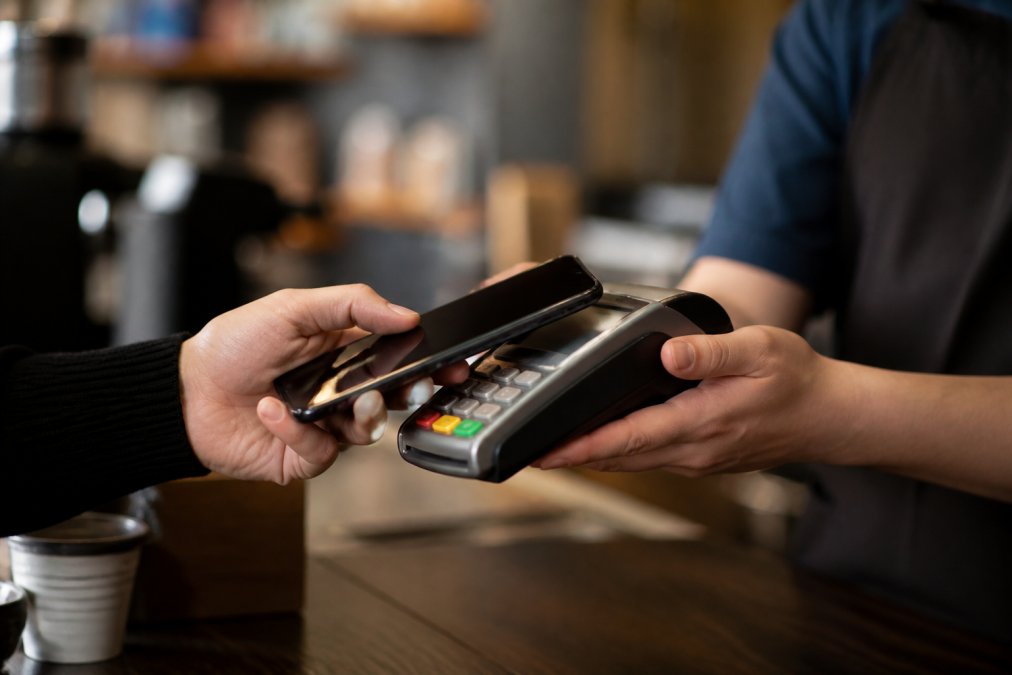
Mobile payments use near field communication (NFC) technology to transmit payment data wirelessly over very short distances. This contactless approach reduces the physical exposure of your card and limits the merchant's access to your information.
The security advantage is straightforward: biometric authentication is harder to compromise than a password. Your fingerprint or face cannot be phished. Your device stores encrypted payment credentials, not your actual card details. If you lose your phone, you can remotely disable the wallet without canceling your card.
Digital wallets also provide transaction monitoring. Unusual activity triggers alerts. Merchants see only a token, not your card number. The payment processor handles authentication, adding another layer of verification between you and the retailer.
For shoppers who want convenience without sacrificing security, digital wallets are the best balance. They work on most modern devices and at millions of merchants. Setup takes minutes. The friction is minimal compared to entering 16-digit card numbers repeatedly.
One limitation: not all merchants accept mobile payments yet. Older retailers or smaller shops may lack NFC-enabled terminals. In those cases, you'll still need a traditional payment method. But the trend is clear, mobile payments are becoming the default for in-person transactions.
Benefits of Using Virtual Credit Cards for Online Purchases
Virtual credit cards are temporary card numbers generated by your bank or a third-party service. Each virtual card links to your real account but displays different digits. You assign spending limits and expiration dates to each one.
Here's the practical benefit: when you shop at a new retailer, you generate a virtual card instead of using your primary card number. If that retailer's database is breached, attackers find a card number that's useless. It has already expired or has a $50 limit. Your actual card remains untouched.
Many banks offer virtual card generation for free through their apps or websites. Services like Privacy.com and Blur create virtual cards on demand. You control the limit, the merchant, and the expiration date. Some services even randomize the card number for each transaction, making it impossible for merchants to build a profile of your spending.
The privacy advantage is significant. Merchants don't see your real card number. They can't track your purchases across multiple stores. Data brokers can't correlate your spending patterns. For privacy-conscious shoppers, virtual cards reduce the digital footprint of every purchase.
Virtual cards work anywhere that accepts credit cards. Online retailers, subscription services, and even some physical stores accept them. The experience is identical to using a regular card, the merchant has no idea they're processing a virtual number.
The main drawback: virtual cards don't help with chargebacks or fraud liability if the merchant itself commits fraud. They protect against data theft, not against merchant dishonesty. For that protection, you need chargeback rights, which come with credit cards but not all payment methods.
How to Identify Secure Checkout Pages and Verify Merchant Safety
A secure checkout page has visible security indicators. The most obvious: a padlock icon in the address bar and "https://" at the start of the URL. These signals mean the page uses SSL encryption. Without them, your data travels unencrypted.
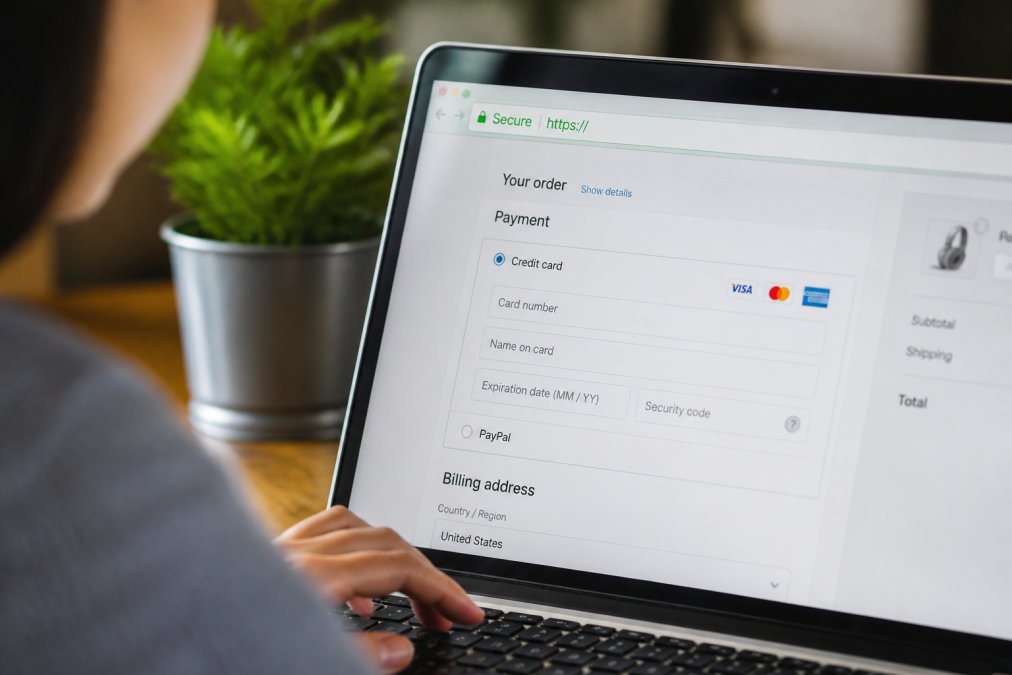
Beyond the padlock, look for these markers:
- A privacy policy that explains how the merchant uses your data
- Clear contact information and a physical address
- Third-party security badges (from Verisign, McAfee, or similar providers)
- A stated security policy that describes encryption and tokenization
- Customer reviews that mention safe checkout experiences
Verify the merchant's legitimacy before entering payment details. Check the domain carefully, scammers create URLs that look similar to real sites (amaz0n.com instead of amazon.com). Visit the merchant's main website directly rather than clicking links from emails. Legitimate retailers have consistent branding, professional design, and transparent policies.
Be skeptical of retailers that ask for unusual information. Your card's CVV should only be requested at checkout, never via email or phone. Your social security number is never needed for online purchases. Requests for this data are almost always phishing attempts.
Payment gateways add another layer of verification. Reputable merchants use established processors like Stripe, Square, or PayPal. These companies handle authentication, fraud detection, and secure data transmission. When you see a familiar payment processor's logo, that's a signal the merchant has met that processor's security standards.
Fraud Protection for Online Shoppers: Your Rights and Recovery
Federal law limits your liability for fraudulent transactions (the FTC). If someone uses your credit card without authorization, you're responsible for no more than $50 (federalreserve.gov). Many card issuers go further, offering zero-liability policies that cover the full amount.
Debit cards offer less protection. Your liability depends on how quickly you report the fraud. Report it within 2 business days, and you're liable for no more than $50 (fdic.gov). Report it after 60 days, and you could lose up to $500. This asymmetry makes debit cards riskier for online shopping than credit cards.
The recovery process starts with notification. Contact your card issuer immediately when you notice fraudulent activity. Most banks can freeze your account within minutes. They'll issue a new card and begin an investigation.
Documentation matters. Gather emails, receipts, and transaction records. Keep a timeline of when you discovered the fraud and when you reported it. Your bank will ask for this information to process your claim.
Chargebacks are your ultimate protection. If a merchant charges you fraudulently or fails to deliver as promised, you can dispute the transaction with your card issuer. The issuer investigates and reverses the charge if the evidence supports you. The merchant loses the money and often faces additional fees.
However, chargebacks take time. The process typically takes 30-90 days. Your money is eventually returned, but you're without those funds during the investigation. Credit cards are better than debit cards for this reason, you're not spending money you need immediately.
Some payment methods offer no chargeback protection. Prepaid cards and bank transfers don't come with the same dispute rights. Wire transfers are nearly impossible to reverse. For maximum protection, use credit cards for online purchases. For maximum privacy, layer in virtual cards and digital wallets.
Comparing Secure Payment Options: Which Method Works Best
Different secure payment methods serve different needs. No single option is best for every situation.
| Payment Method | Best For | Primary Security Feature | Liability Protection | Privacy Level |
|---|---|---|---|---|
| Credit Card | General online shopping | Chargeback rights | $0-$50 | Moderate |
| Digital Wallet | Quick, frequent purchases | Biometric verification | $0-$50 | High |
| Virtual Card | New retailers, privacy | Card number masking | Limited | Very High |
| Bank Transfer | Large purchases, B2B | Direct verification | Very Low | Moderate |
| Prepaid Card | Budget control, privacy | Balance limit | Very Low | Very High |
Credit cards remain the safest choice for most online shoppers. They offer chargeback rights, fraud liability limits, and dispute resolution. Your bank investigates unauthorized charges at no cost to you. The downside: merchants see your card number, and data breaches expose that number.
Digital wallets reduce that exposure by using biometric verification and tokenization. They're fast, convenient, and secure. The limitation: they only work on compatible devices and at merchants with NFC terminals. For online shopping specifically, they're less useful than for in-person payments.
Virtual cards solve the merchant-data-breach problem. They're excellent for trying new retailers or managing recurring subscriptions. The tradeoff: they don't protect against merchant fraud or non-delivery. If a retailer charges you for something you never received, a virtual card won't help you dispute it.
Bank transfers and ACH payments move money directly from your account. They're common for B2B transactions and large purchases. However, they lack chargeback protection. Once the money leaves your account, recovery is difficult. Use them only with merchants you fully trust.
Prepaid cards offer maximum privacy and spending control. No personal information links to the card. You can't overspend because the card has a fixed balance. The security tradeoff: minimal fraud protection and no dispute rights. If the merchant disappears with your money, you have little recourse.
For most online shoppers at Esther Tech Shop and other retailers, the optimal strategy is layered security. Use a credit card as your primary payment method for the chargeback protection. Add a digital wallet for frequent purchases on mobile devices. Generate virtual cards for new merchants or one-time purchases. Keep a prepaid card for situations where privacy is paramount.
This approach balances security, convenience, and privacy. You're not putting all your financial eggs in one basket. Each method handles different scenarios where it provides the strongest protection.
Secure payment methods aren't just about technology, they're about peace of mind. When you understand how encryption, tokenization, and fraud protection work together, you can shop with confidence. At Esther Tech Shop, we've implemented multiple layers of security because we know your trust is earned through reliable protection and transparent practices. Our 24-48 hour shipping guarantee and attentive customer service team ensure that if any issue arises with your order, we resolve it quickly. Get started with secure, hassle-free shopping at Esther Tech Shop and experience the difference that genuine security and customer focus make.
Frequently Asked Questions
What is the safest way to pay for online shopping?
The safest approach combines multiple layers: use payment methods with built-in fraud protection like credit cards or digital wallets, enable two-factor authentication on your account, verify the merchant uses encryption (look for the padlock icon and HTTPS in the URL), and monitor your statements regularly. Virtual credit cards add extra protection by generating temporary card numbers. Credit cards offer chargeback rights under federal law, meaning you can dispute unauthorized charges within 60 days.
How do benefits of using virtual credit cards improve online security?
Virtual credit cards generate temporary card numbers tied to your real account, preventing merchants from storing your actual card details. If a data breach occurs, the exposed temporary number is useless for future purchases. They limit transaction amounts and set expiration dates, reducing fraud exposure. This tokenization approach protects your primary account information while allowing you to shop with confidence across multiple retailers without exposing your real card number.
How can I verify if an online store's payment gateway is secure?
Check for the padlock icon in your browser's address bar and confirm the URL starts with HTTPS, not HTTP. Review the privacy policy and look for mentions of encryption, compliance certifications, and data protection standards. Reputable merchants display security badges from verified payment processors. Avoid entering payment information on unsecured connections or suspicious websites. When shopping at Esther Tech Shop, you'll find clear security indicators and transparent information about our payment protection measures.
What fraud protection do I have if something goes wrong with my online purchase?
Credit card holders have strong protections: the Fair Credit Billing Act limits your liability to $50 for unauthorized charges, and many issuers offer zero-liability policies. You have 60 days to dispute charges. Digital wallet providers and banks offer transaction monitoring to detect suspicious activity. If fraud occurs, contact your card issuer immediately to freeze your account and initiate a chargeback. Keep receipts and documentation of your purchase for dispute resolution. Most retailers, including Esther Tech Shop, stand behind their transactions with secure payment processing.
This article was written using GrandRanker