 how-to
Tips for Clean Desk Setup: A Practical Guide
Table of Contents
- Why a Clean Desk Setup Matters for Productivity
- Desk Cable Management Ideas That Actually Work
- Minimalist Desk Accessories That Reduce Visual Noise
- Ergonomic Desk Setup Guide for Long Work Hours
- Small Desk Organization Hacks for Tight Spaces
- Daily Cleaning Routines to Maintain Your Setup
- Decluttering Strategies for a Blank Canvas Workspace
- The Psychological Impact of a Clutter-Free Desk
Last Updated: August 7, 2026
Why a Clean Desk Setup Matters for Productivity
A clean desk setup directly impacts how effectively you work. When your workspace is organized and free from clutter, your brain can focus on the task at hand instead of processing visual noise. Cables tangled across your desk, papers stacked haphazardly, and scattered peripherals create cognitive load that reduces your ability to concentrate.
At Esther Tech Shop, we understand that a well-organized tech setup is foundational to productivity. The way you organize cables, monitors, and peripherals affects both your efficiency and your ability to think clearly. A clean desk reduces mental friction and creates space for what matters most.
Beyond productivity, there's a psychological benefit to maintaining a clean workspace. A minimal desk signals control and intentionality, telling your brain that this is a space for focused work. This distinction matters when working from home, where your office shares space with your living environment.
Desk Cable Management Ideas That Actually Work
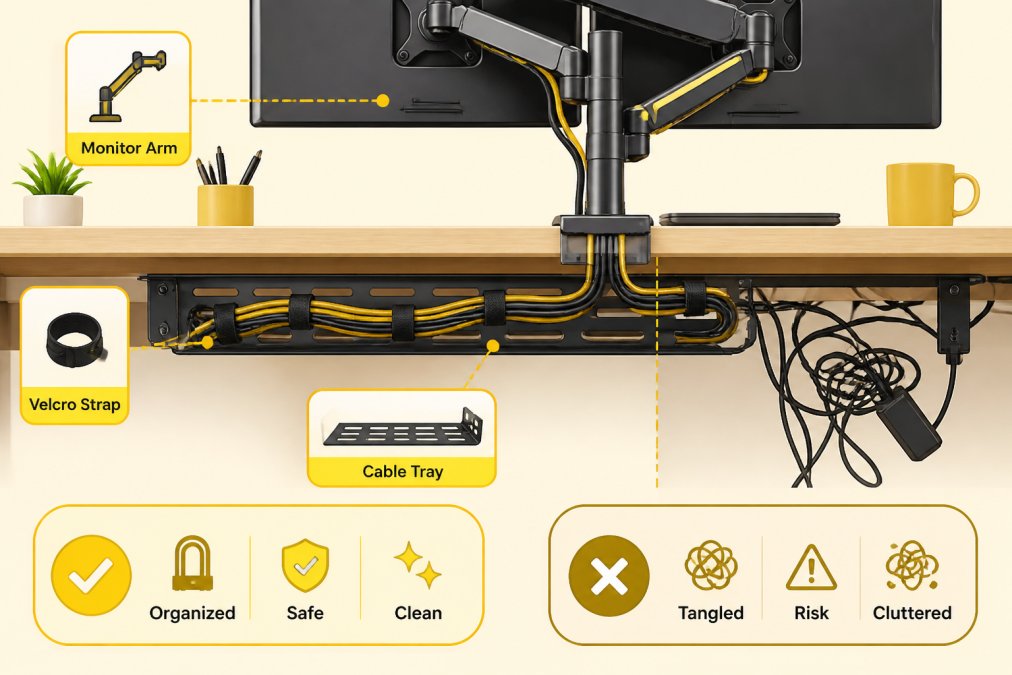
The tangle of cables behind most desks is the primary culprit in cluttered workspaces. Effective cable management starts with a simple principle: route cables out of sight and group them by function.
Budget-Friendly DIY Cable Routing
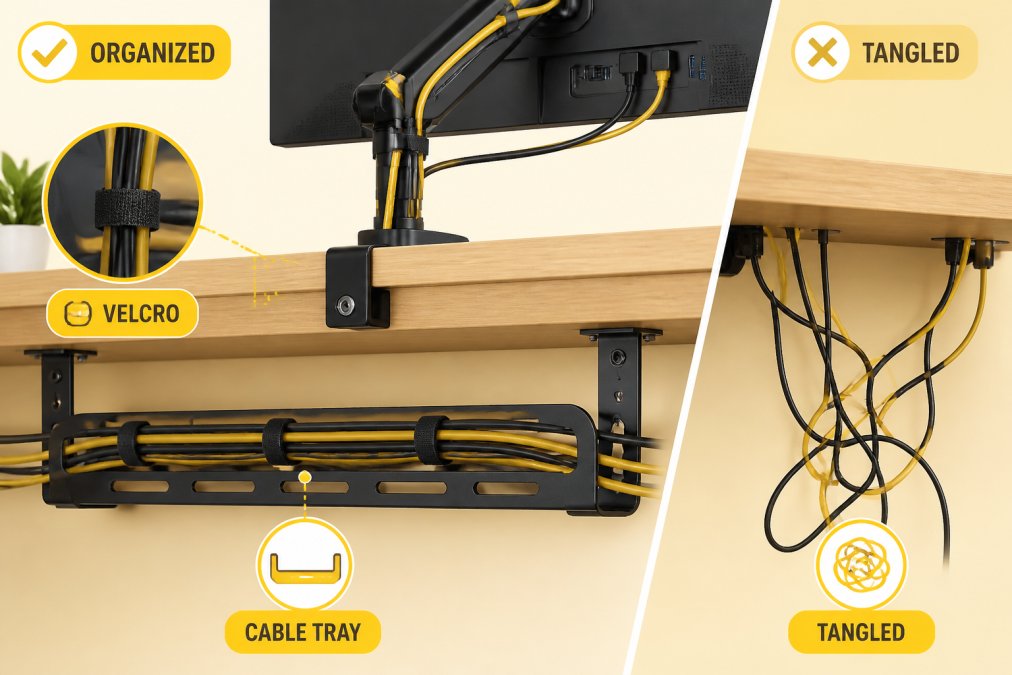
Start by running cables along the back edge of your desk using adhesive cable clips or velcro straps. For cables that drop down the back, use a cable tray mounted underneath, a basic metal or plastic tray costs $15-30 and holds dozens of cables in organized rows. Label each bundle with small tags so you can identify which cable connects to what without tracing it.
Another DIY approach is using PVC pipe or foam tubing to bundle cables together. Cut the tubing lengthwise, wrap it around your cable bundles, and you've created a clean appearance while protecting cables from damage for under $10.
The key insight: cable management isn't about having the perfect system from day one. Start with cable clips, add a tray when needed, upgrade to sleeves when ready. Each step improves your workspace incrementally.
Cable Sleeves and Clips for Cleaner Aesthetics
Cable sleeves bundle multiple cables into a single, clean line. A 1-inch sleeve handles 4-6 cables, while larger sleeves manage 10+ cables in one bundle. The aesthetic improvement is immediate, instead of seeing dozens of individual cables, you see organized lines.
Cable clips anchor individual cables to your desk or wall, preventing movement and creating clean routing paths. Adhesive clips work on most surfaces without drilling. The combination of sleeves and clips creates a professional appearance that signals your workspace is intentional and controlled.
Minimalist Desk Accessories That Reduce Visual Noise
Every item on your desk should serve a function or bring genuine value. Start by auditing everything currently on your desk and removing items you don't use regularly.
A quality desk mat defines your workspace, protects your desk surface, and anchors your setup visually. Modern desk mats are slim and make cable management easier by providing a defined area where cables can route underneath.
A docking station or cable hub reduces visible cables dramatically. Instead of having 6 individual USB cables running from your computer, a single docking station with one USB connection creates a cleaner aesthetic while improving functionality. Wireless peripherals, keyboard, mouse, and charging pads, eliminate additional cables immediately.
Ergonomic Desk Setup Guide for Long Work Hours
Productivity means nothing if you're in pain. An ergonomic desk setup supports your body during long work sessions and prevents chronic issues from poor positioning.
Your monitor should be positioned so the top of the screen is at or slightly below eye level when sitting upright. This prevents neck strain. Your keyboard and mouse should be at a height where your elbows are at 90 degrees and your wrists are neutral. Most people position their keyboard too high, forcing their wrists into an extended position that causes strain over time.
Monitor Arm and Desk Mat Positioning
A monitor arm is one of the best ergonomic investments you can make. Unlike a fixed stand, an arm allows you to adjust your monitor's height and angle precisely. Most monitor arms mount to the back of your desk or clamp to the desk edge. Desk clamps are better for small desks because they don't use desk surface area.
Position your desk mat to cover the area where your keyboard and mouse sit, plus a few inches beyond. This creates a cohesive workspace and prevents your keyboard from sliding around.
Lighting and Ambiance for Workspace Comfort
Poor lighting creates eye strain and headaches during long work sessions. Position your desk perpendicular to windows rather than facing them directly to avoid screen glare.
Use a combination of overhead and task lighting. Position your desk lamp to the side of your monitor rather than directly behind it. Cooler light (5000K or higher) is better for focused work during the day. Warmer light (3000K or lower) is better in the evening because it's less disruptive to your sleep cycle. Ambient lighting that's slightly dimmer than your task lighting reduces contrast between your bright monitor and dark surroundings, decreasing eye strain.
Small Desk Organization Hacks for Tight Spaces
Limited desk space requires strategic choices about what lives on your desk. A typical small desk is 36-48 inches wide and 20-24 inches deep, enough for a monitor, keyboard, and mouse, but not much else.
The key to small desk organization is using vertical space instead of horizontal space. Wall-mounted shelves, pegboards, and hanging organizers keep items off your desk surface while keeping them accessible.
Vertical Storage and Compartments
A wall-mounted organizer with compartments holds pens, notepads, cables, and small supplies in a compact footprint. Position it within arm's reach of your desk but high enough that it doesn't obstruct your monitor view.
Shelving above your desk works well for items you need occasionally. Books, backup supplies, and decorative items can live on a shelf, keeping your desk surface clear for active work. Cable management is even more critical in small spaces, use cable sleeves and clips to bundle cables and route them along the back of your desk or down the wall.
Docking Stations to Maximize Surface Area
A docking station consolidates multiple cables and connections into a single device. Instead of individual cables running from your laptop to your monitor, keyboard, mouse, and other peripherals, a single USB cable connects your laptop to the docking station. This frees up desk surface area and makes your setup more flexible.
Position your docking station at the back of your desk or to the side, out of your main working area. A docking station also improves your ergonomic setup by allowing you to position your laptop screen at the correct height using an external monitor.
Daily Cleaning Routines to Maintain Your Setup
A clean desk setup requires consistent maintenance. The simplest routine takes five minutes at the end of each workday: remove items that don't belong on your desk and return them to their proper locations.
Wipe down your desk surface with a damp microfiber cloth once a week. Pay special attention to your keyboard and mouse, which accumulate dust and skin oils over time. Check your cable management weekly to ensure cables haven't become tangled or loose.
Monthly, do a deeper clean. Remove your monitor and clean the back of your desk thoroughly. Check that your cable management system is still working effectively and assess whether your setup still serves your needs.
Decluttering Strategies for a Blank Canvas Workspace
The goal of a clean desk setup is a blank canvas, a workspace free from unnecessary items and ready for focused work. Start by taking everything off your desk and sorting it into categories: daily use, weekly use, occasional use, and never use.
Daily-use items go back on your desk. Everything else goes into storage, drawers, or gets removed from your office entirely. For items you use occasionally, create a storage system that keeps them accessible but not visible. The hardest part is letting go of items you think you might need. Keep one or two backup cables for your most-used devices; donate or recycle the rest.
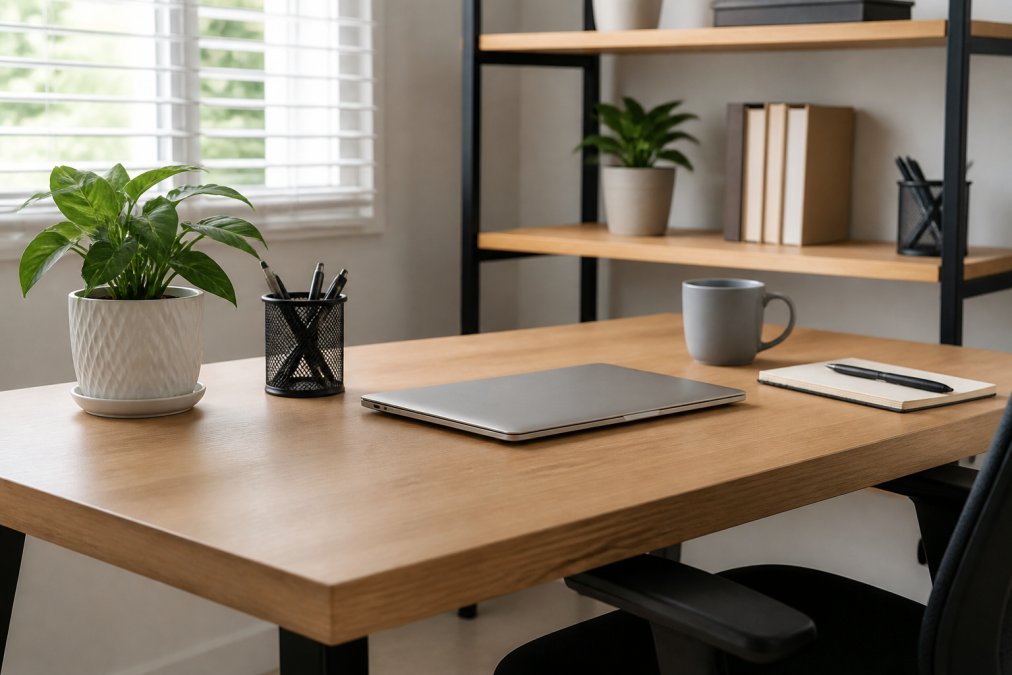
Apply the same principle to desk accessories. Each item on your desk should be something you actively use or genuinely enjoy looking at. A single plant, meaningful photo, or piece of art you love can live on your desk if it brings you genuine value. The difference is intentionality.
The Psychological Impact of a Clutter-Free Desk
Visual clutter creates cognitive load. Your brain processes every item in your visual field, even when you're not consciously aware of it. A desk covered with papers, cables, and miscellaneous items forces your brain to constantly process irrelevant visual information, reducing your ability to concentrate and increasing mental fatigue.
A clean desk creates a sense of control and calm. When your workspace is organized, you feel more in control of your environment. This sense of control reduces stress and creates a more positive emotional state while you work.
An empty desk signals possibility and focus. It tells your brain that this space is dedicated to intentional work, not a catch-all for random items. Maintaining a clean desk also builds momentum, each day you maintain your workspace, you reinforce the habits that keep it clean, creating a positive feedback loop.
For remote working professionals who spend 8+ hours a day at their desk, this psychological impact is substantial. Your workspace becomes your professional environment, and its condition affects your professional performance. A clean desk setup is a tool for better work and better mental health.
At Esther Tech Shop, we recognize that creating and maintaining a clean desk setup requires the right accessories and tools. From cable management solutions to ergonomic equipment and desk organizers, the products you choose directly impact how easily you can maintain an organized workspace. Our curated selection of high-quality tech accessories is designed to support clean, functional desk setups. With fast 24-48 hour shipping and attentive customer service available Monday to Saturday, 9 a.m. - 8 p.m., we make it easy to upgrade your workspace. Explore our collection and transform your desk setup into a focused, productive environment.
| Strategy | Implementation | Impact |
|---|---|---|
| Cable management | Use sleeves, clips, and trays to organize cables | Reduces visual noise and improves accessibility |
| Minimalist accessories | Keep only essential items on desk surface | Decreases cognitive load and increases focus |
| Ergonomic positioning | Adjust monitor height, keyboard angle, and lighting | Prevents strain and supports long work sessions |
| Vertical storage | Use shelves and wall organizers for supplies | Maximizes limited desk space |
| Daily routines | 5-minute end-of-day cleanup and weekly deep clean | Maintains organization and prevents clutter accumulation |
| Decluttering | Remove items you don't use regularly | Creates blank canvas workspace |
Frequently Asked Questions
How do I keep my desk setup clean and organized every day?
Establish a 5-minute end-of-day routine: clear loose items into desk organizers, wipe your desk surface with a damp cloth, and route cables back through sleeves or clips. Use compartments for pens, chargers, and peripherals so everything has a designated spot. The key is consistency, daily maintenance prevents clutter from accumulating and keeps your workspace ready for the next day.
What are the best cable management ideas for reducing desk clutter?
Combine multiple strategies for maximum impact. Use cable sleeves to bundle cords together, cable clips to route them along desk edges, and a cable tray mounted underneath to hide peripherals and power strips. For a budget-friendly approach, velcro cable ties work well for temporary arrangements. Label cables at both ends so you know which device each one serves, making future adjustments easier.
Does a clean desk actually improve productivity?
Yes. A clutter-free workspace reduces visual noise and decision fatigue, allowing your brain to focus on work rather than the disorganization around you. Studies suggest that organized environments improve concentration and reduce stress. Additionally, an aesthetic, clean desk setup creates a professional atmosphere that encourages better work habits and makes it easier to find tools and documents when you need them.
What minimalist desk accessories should I prioritize for a clean setup?
Focus on multi-functional items: a monitor arm to free up surface area, a docking station to consolidate peripherals, a desk mat to define your workspace, and desk organizers with compartments. Choose accessories in neutral colors and clean lines to maintain a minimalist aesthetic. Avoid decorative items that add visual clutter, every accessory should serve a purpose and contribute to your workspace layout.
This article was written using GrandRanker