 listicle
Best Wireless Chargers for Desks: 2026 Guide
Table of Contents
- Quick Comparison Table
- What to Look For in Wireless Chargers for Desks
- Qi-Certified Desk Chargers: Standards and Performance
- Invisible Wireless Charger for Desk: Under-Desk Solutions Explained
- Top Wireless Chargers for Your Desk Setup
- Under-Desk Wireless Charger Installation: Setup and Material Compatibility
- Charging Speed, Wattage, and Cable Management
- Safety Features and Long-Term Battery Health
Last Updated: August 9, 2026
Quick Comparison Table
| Charger | Type | Charging Speed | Best For | Price |
|---|---|---|---|---|
| 15W Magnetic Wireless Charger Mouse Pad | Desktop pad | 15W fast charging | Workspace organization | $97.18 |
| 3-in-1 Wireless Charger Stand | Multi-device stand | 15W iPhone / 5W AirPods | Apple ecosystem users | $95.39 |
| Three-in-One Magnetic Wireless Charger | Compact stand | 9V/2A output | Budget-conscious buyers | $69.93 |
| Anker 3-in-1 Cube with MagSafe | Foldable travel | 15W MagSafe | Portability and travel | $149.95 |
| Belkin BoostCharge Pro | Flat pad | 15W iPhone / 10W Watch | Minimalist desk setup | $149.99 |
What to Look For in Wireless Chargers for Desks
When evaluating wireless chargers, wattage output is critical, higher wattage enables faster charging if your devices support it. A Qi-certified desk charger should deliver 7.5W to 15W for smartphones, with dedicated modules for wearables offering 5-10W output.

Magnetic alignment optimizes coil positioning, reducing charging distance and improving efficiency. MagSafe-compatible chargers reduce charging time by approximately 20% compared to non-magnetic alternatives and minimize heat generation.
Material compatibility is essential. Wood, plastic, and composite materials work reliably, while metal desks interfere with induction coil performance. Chargers work best through surfaces under 5mm thick; thicker desks significantly degrade performance.
Thermal protection and heat dissipation separate reliable chargers from problematic ones. Long-term battery health depends on keeping device temperatures below 95°F during charging. Look for chargers with foreign object detection and overheat protection.
USB-C input is preferable to proprietary connectors, offering compatibility with other devices and future-proofing your investment. Braided cables reduce clutter and last longer than standard plastic-coated cables.
Qi-Certified Desk Chargers: Standards and Performance
Qi-certified chargers meet strict international standards for wireless power transmission, ensuring safety and compatibility across device brands. Qi2 certification adds magnetic alignment technology, enabling faster charging speeds up to 15W for compatible devices.
Qi2-certified chargers deliver up to 25W with advanced technology, significantly faster than standard Qi chargers capped at 7.5W-10W. If you charge devices daily, Qi2 certification justifies the higher investment through faster charging cycles and reduced heat generation.
Qi-certified chargers include mandatory safety features: foreign object detection prevents charging metal objects, and thermal management automatically reduces power if device temperature rises. These features protect your smartphone's battery from degradation caused by excessive heat.
Premium Qi-certified options from brands like Belkin and Nomad include active cooling or advanced thermal sensors that maintain optimal charging temperatures, while cheaper alternatives often fail thermal management under real-world conditions.
Charging distance directly affects efficiency. Standard Qi chargers require placement within 5mm of your device. Qi2 chargers maintain performance up to 8mm, allowing thicker phone cases without sacrificing speed.
Invisible Wireless Charger for Desk: Under-Desk Solutions Explained
An invisible wireless charger for desk mounting charges devices placed on top without visible cables or charging stands. The technology works through non-metal materials using induction coils positioned directly below your workspace.

Installation involves securing the charger to the underside of your desk with adhesive strips or mounting brackets, then running a single power cable to a nearby outlet. The process takes 10-15 minutes for straightforward setups.
Material compatibility is non-negotiable. Wood desks work perfectly; laminate and composite materials also perform reliably. Metal desks or aluminum surfaces will block or severely degrade charging. Verify your desk material before purchasing.
Surface thickness directly impacts performance. Chargers work optimally through surfaces 3-5mm thick. Thicker desks (8mm+) reduce charging speed and increase heat generation.
Position the charger directly beneath where you naturally place your phone while working. Mark the exact location with tape before installation, ensuring the charger aligns with your actual device placement patterns.
Top Wireless Chargers for Your Desk Setup
15W Magnetic Wireless Charger Mouse Pad: Workspace Organization at Its Best
The 15W Magnetic Wireless Charger Mouse Pad from Esther Tech Shop combines functional workspace organization with fast charging capability. The magnetic alignment ensures consistent 15W output for compatible devices, and the mouse pad format means you're already occupying that desk real estate.
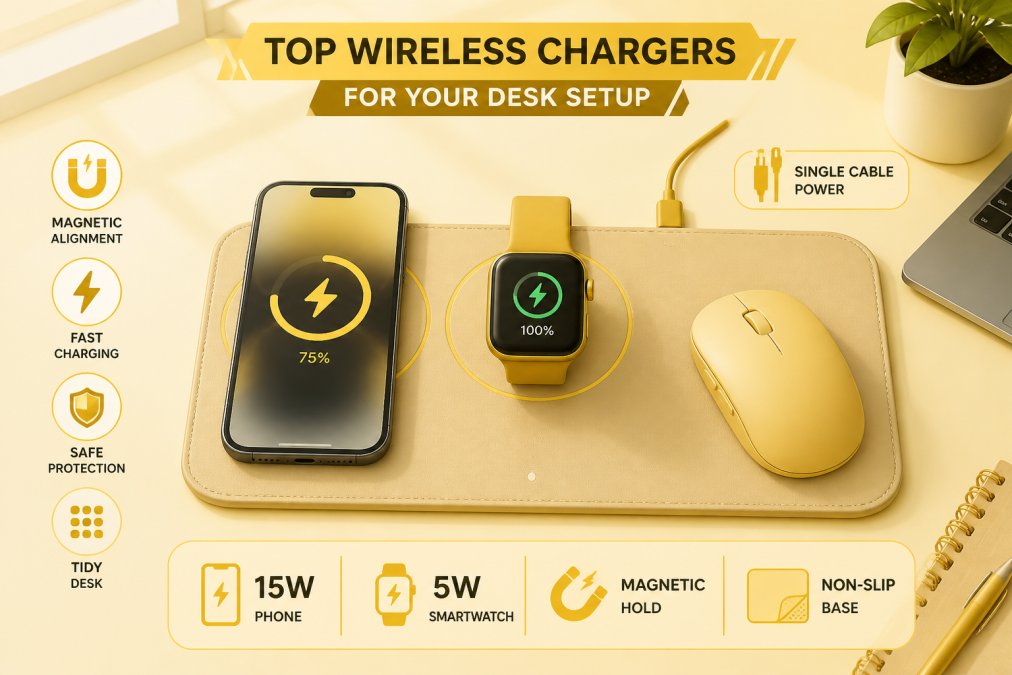
The dual-purpose design consolidates two desk accessories into one, directly addressing cable clutter concerns. At $97.18, it positions between budget options and premium multi-device stands.
The magnetic alignment delivers consistent 15W charging speeds and reduces charging time by approximately 20% compared to non-magnetic alternatives while minimizing heat generation. Installation is straightforward, place the mouse pad on your desk and connect the single USB-C cable to a nearby outlet.
3-in-1 Wireless Charger Stand: Multi-Device Charging for Apple Users
The 3-in-1 Wireless Charger Stand for iPhone from Esther Tech Shop targets users with complete Apple ecosystems. This stand delivers simultaneous charging for iPhone, Apple Watch, and AirPods through dedicated modules, eliminating multiple cables and adapters. At $95.39, it's competitively priced against comparable alternatives.
The stand design provides ergonomic device positioning with your iPhone at a natural viewing angle, Apple Watch on a dedicated module, and AirPods on a flat charging pad. All devices remain within arm's reach while maintaining desk organization.
Charging speeds meet Apple's specifications: 15W for iPhone (with MagSafe compatibility), 5W for AirPods, and fast charging for Apple Watch Series 7 and later. The dedicated Apple Watch module is critical, as standard Qi pads don't support Apple Watch charging.
Instead of three separate charging cables, you have one power input to the stand, dramatically simplifying cable management and reducing desk clutter.
Three-in-One Magnetic Wireless Charger: Fast Charging with Thermal Protection
The Three-in-One Magnetic Wireless Charger from Esther Tech Shop offers the best value at $69.93. Despite the lower price, it delivers 9V/2A output with reliable charging for multiple devices simultaneously, and magnetic alignment ensures consistent performance.
This model includes thermal protection that automatically throttles charging if device temperature rises above safe thresholds, directly extending battery lifespan. The Type-C input connector offers versatility; you can use any standard USB-C power adapter if the included one fails.
The compact stand design works well for desks with limited space. The magnetic alignment keeps devices stable during charging, preventing the common problem of devices sliding off traditional stands. Available in Dark Gray, Black, and Silver finishes, it integrates with various desk aesthetics.
Premium Alternatives for Desktop Aesthetics
The Nomad Base One Max ($149.95) features heavy metal and glass construction providing stability that cheaper stands lack. The weighted base prevents accidental displacement in busy workspaces. However, it requires a separate 30W USB-C power adapter (not included).
The Courant MAG:2 ($100-$150) brings luxury materials to desk charging with Italian leather or Belgian linen finishes. The dual-charger layout accommodates iPhone and AirPods, though it lacks a dedicated Apple Watch module.
The Belkin BoostCharge Pro ($149.99, often on sale for $59.99) offers the flattest profile among premium options. The lay-flat design maximizes available surface area, and the 40W power supply is included with official MagSafe certification.
The ESR HaloLock 3-in-1 with CryoBoost ($79.99) provides active cooling through an integrated fan, maintaining optimal charging temperatures and extending battery health compared to passive chargers.
Under-Desk Wireless Charger Installation: Setup and Material Compatibility
Installing an invisible wireless charger requires careful planning around material compatibility and electrical routing. Begin by verifying your desk material with the manufacturer if uncertain. Wood, laminate, and composite materials work reliably; metal desks will fail completely.

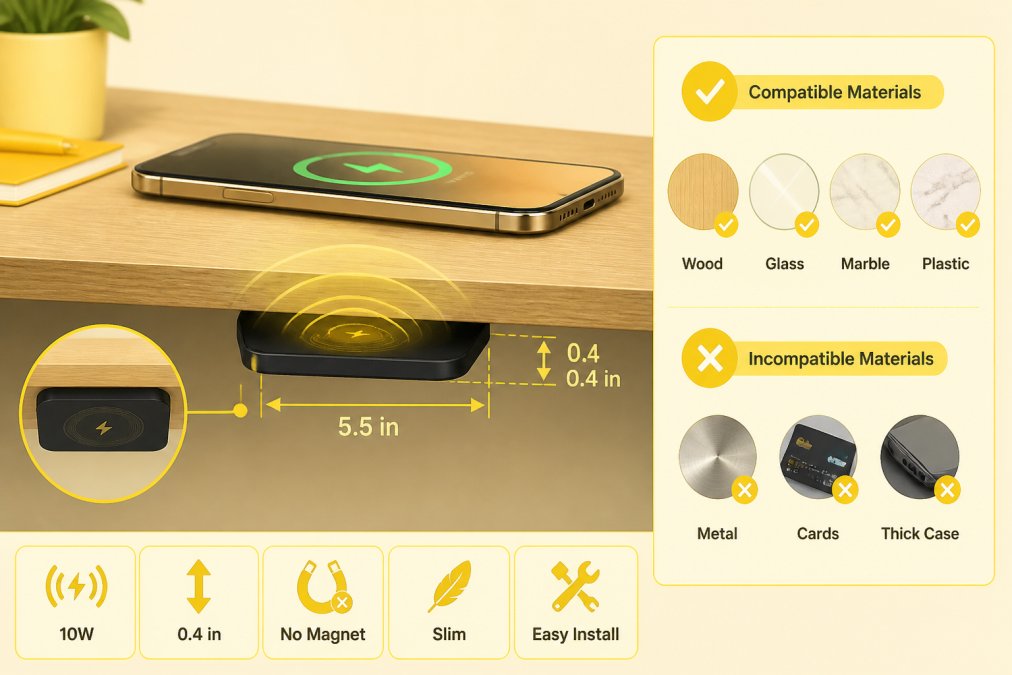
Measure your desk thickness precisely. Chargers optimized for under-desk mounting work through surfaces up to 5mm thick. Thicker desks require higher-wattage chargers or surface-mounted alternatives.
Mark the mounting location before installation. Most users install chargers directly beneath their primary work area. Use painter's tape to outline the charger footprint on the desk underside, then identify the corresponding position on the desk surface.
Clean the desk surface thoroughly before adhesive installation using a microfiber cloth with rubbing alcohol, then allow 5 minutes for complete drying.
Route the power cable to a nearby outlet, securing it with cable clips to the desk underside. Most installations require 6-8 feet of cable routing to reach a convenient outlet.
Test charging before finalizing installation. Place your smartphone on the desk surface directly above the charger; you should see the charging indicator activate within 2-3 seconds. If charging fails, the surface material may be incompatible or the charger misaligned.
For desks with cable management channels or grommets, route the power cable through these existing pathways. If no built-in channels exist, use adhesive cable clips spaced 12 inches apart along the desk underside.
Charging Speed, Wattage, and Cable Management
Charging speed depends on three variables: the charger's wattage output, your device's charging capability, and the power adapter supplying the charger. A 15W charger paired with a weak 5W power adapter will deliver only 5W output. Verify that your power adapter matches or exceeds the charger's rated wattage.
A 15W Qi charger delivers that speed only to compatible devices. iPhones support up to 15W wireless charging (iPhone 12 and later with MagSafe), while older models cap out at 7.5W. Android devices vary widely; Samsung Galaxy phones support up to 15W, while many budget models support only 5-10W. Know your device's maximum wireless charging speed before selecting a charger.
Multiple charging cables create visual clutter and trip hazards. Consolidating to fewer, shorter cables through multi-device chargers or under-desk solutions dramatically improves workspace organization. Single USB-C input cables are preferable to proprietary connectors.
Heat dissipation affects both charging speed and long-term battery health. Chargers with active cooling maintain faster speeds over extended sessions by preventing thermal throttling. Passive chargers generate excess heat during intensive charging, forcing automatic power reduction.
Modern chargers consume 0.5-2W in standby mode. Premium chargers with smart power management reduce standby consumption to under 0.5W, a minor consideration but worth noting for environmentally conscious users.
Safety Features and Long-Term Battery Health
Foreign object detection prevents your charger from delivering power when metal objects are placed on the charging surface. All Qi-certified chargers include mandatory foreign object detection.
Thermal protection is the most critical safety feature for long-term battery health. Chargers that monitor device temperature and automatically reduce power if thresholds are exceeded prevent degradation. A charger maintaining 95°F during charging preserves battery capacity 15-20% longer than one allowing temperatures to reach 110°F.
Overheat protection in the charger itself prevents failures that could damage your device. If the charger's internal components exceed safe temperature limits, built-in thermal fuses automatically disconnect power.
Wireless chargers supporting trickle charging (reducing power after reaching 80% capacity) extend battery health compared to chargers maintaining full power throughout the charging cycle.
Qi-certified chargers undergo rigorous testing for electromagnetic field (EMF) safety. Wireless charging operates at frequencies that don't penetrate human tissue, making EMF exposure negligible compared to cellular networks or WiFi routers.
The right wireless charger for your desk transforms your workspace from a cable-tangled mess into an organized, efficient environment. Quality options exist at every price point. The 15W Magnetic Wireless Charger Mouse Pad, 3-in-1 Wireless Charger Stand, and Three-in-One Magnetic Wireless Charger from Esther Tech Shop deliver reliable performance backed by fast shipping within 24-48 hours and responsive customer service available Monday through Saturday, 9 a.m. to 8 p.m. Get started with Esther Tech Shop and eliminate cable clutter while keeping all your devices charged and ready throughout your workday.
Frequently Asked Questions
Do wireless chargers work through wood desks for invisible under-desk installations?
Yes, wireless chargers work through wood desks because induction coils transmit power through non-metal surfaces. Wood thickness up to 1 inch typically allows full charging efficiency. However, thick desks or those with metal reinforcements may reduce charging distance and speed. Test your desk material before purchasing an invisible wireless charger for desk use to ensure optimal performance.
What's the difference between Qi-certified desk chargers and standard wireless chargers?
Qi-certified desk chargers meet international wireless charging standards, ensuring compatibility with a wider range of devices and safer power delivery. Standard chargers may lack foreign object detection or thermal protection. Qi-certified options guarantee consistent wattage output, magnetic alignment on newer models, and protection against overheating, making them the safer choice for daily desk use.
Can wireless chargers damage my phone's battery with long-term use?
Modern Qi-certified desk chargers include thermal protection and heat dissipation features that minimize battery stress. Wireless charging generates slightly more heat than wired charging, but quality chargers manage this through cooling technology. Using a charger with foreign object detection and proper thermal management helps preserve battery health. Avoid leaving devices on chargers for extended periods after they reach full capacity.
How fast do desk wireless chargers charge compared to wired cables?
Wireless chargers typically deliver 7.5W to 15W output, while wired fast chargers deliver 20W to 30W or more. This means wired charging is 30-40% faster for most phones. However, for desk use where your device sits idle, wireless chargers provide sufficient speed. The convenience of cable-free charging and workspace organization often outweighs the slightly longer charging time for professionals working from home.
Why should I buy wireless chargers from Esther Tech Shop instead of larger retailers?
Esther Tech Shop guarantees shipping within 24-48 hours with secure payment options and attentive customer service available Monday to Saturday, 9 a.m. to 8 p.m. We offer high-quality products at fair prices with simple returns and hassle-free support. Our curated selection focuses on reliability and performance, backed by real customer testimonials. Fast delivery and professional support make upgrading your desk setup convenient and risk-free.
This article was written using GrandRanker